

Most note-taking apps look the same. A blank page, a few folders, maybe some color-coded labels. They get the job done, but they never feel like they were built for you. They feel like they were built for everyone, which means they were really built for no one.
Hacker Notes is different. It was designed with a specific kind of person in mind: someone who thinks fast, moves fast, and needs a tool that keeps up without getting in the way. If you have ever felt like your notes app was slowing you down instead of helping you, this article is for you.
The Problem With Most Note-Taking Apps
Before we talk about what makes Hacker Notes stand out, it helps to understand what the competition gets wrong. Most popular note-taking apps fall into one of two traps.
The first trap is feature bloat. Apps like Notion and Evernote pack in so many tools, databases, templates, nested pages, collaboration boards, and widgets, that opening them for a quick thought feels like pulling out a Swiss Army knife to slice a grape. The complexity becomes the obstacle.
The second trap is blandness. Apps that strip everything away leave you with nothing but a plain text field and zero personality. They work, technically. But they never feel like something you actually want to open.
Hacker Notes was built to escape both traps entirely.
What Makes Hacker Notes Different
1. It Has a Personality
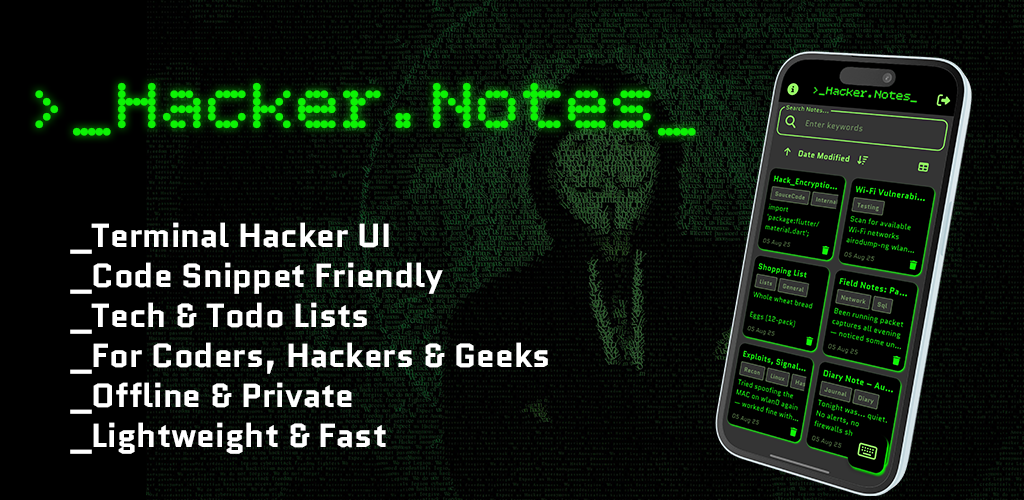
The moment you open Hacker Notes, it feels different. The aesthetic is sharp, dark, and focused. It looks like something a developer or power user would actually choose to use, not something handed to them by a corporate product team trying to appeal to everyone.
That personality matters more than people realize. When an app feels right, you use it more. When you use it more, your note-taking habit actually sticks. Design is not just decoration. It is the difference between a tool you abandon and one you rely on every day.
- Other apps: Designed to look inoffensive to the broadest possible audience.
- Hacker Notes: Designed to feel sharp, focused, and built for people who take their work seriously.
2. Speed Is the Core Feature
Good ideas do not wait. They show up mid-conversation, during a commute, or in the thirty seconds between tasks. If your notes app takes five seconds to load and three more taps to create a new note, the idea is already halfway gone.
Hacker Notes opens fast and gets out of your way immediately. Creating a new note is instant. There is no loading screen, no onboarding wizard, no upsell popup blocking the page. You open it, you write, you close it. That is the whole experience, and it is exactly what a notes app should feel like.
- Other apps: Multiple taps to reach a blank note, sometimes with ads or prompts in between.
- Hacker Notes: Tap, type, done. Your idea is captured before it slips away.
3. No Unnecessary Complexity
There is a reason experienced developers and writers often prefer minimal tools. Complexity is the enemy of flow. When an app gives you fifty options every time you want to do something simple, you stop thinking about the work and start thinking about the app.
Hacker Notes gives you exactly what you need and nothing you do not. The interface is clean and logical. Organization is intuitive. You can find any note quickly without digging through nested folders or remembering which workspace you dropped something into three weeks ago.
- Other apps: Features stacked on features, most of which you will never use.
- Hacker Notes: A focused set of tools that work together smoothly so you can stay in your creative zone.
4. Built for Offline Use

A lot of modern apps are quietly dependent on your internet connection. They slow down without it, refuse to sync, or flat out break. That is a serious problem when inspiration strikes underground, on a plane, or anywhere your signal is unreliable.
Hacker Notes works fully offline. Your notes are available whenever you need them, not just when your phone has bars. This makes it genuinely reliable in a way that cloud-first apps simply cannot match in every situation.
- Other apps: Often dependent on connectivity for full functionality.
- Hacker Notes: Fully functional offline, always ready when you are.
5. It Does Not Try to Be a Productivity Suite
This might sound like a limitation. It is actually one of the best things about Hacker Notes. Apps that try to be your task manager, calendar, project board, wiki, and note-taking tool all at once end up being mediocre at all of them. They suffer from identity crisis, and so do the people using them.
Hacker Notes knows what it is. It is a note-taking app. A great one. It does that single job with more focus and care than most apps that try to do everything. And when a tool does its job this well, you actually trust it with your important thoughts.
- Other apps: Trying to be everything, becoming nothing outstanding.
- Hacker Notes: Exceptionally good at note-taking, full stop.
How Hacker Notes Compares to the Big Names
Hacker Notes vs. Notion
Notion is a powerful workspace tool. It is also a significant time investment. Setting up a Notion system that works for you can take hours or days, and maintaining it takes ongoing effort. If you want a second job managing your productivity system, Notion is your app. If you want to write a note in ten seconds and move on with your life, Notion is probably overkill.
Hacker Notes requires no setup. You download it, open it, and start writing. The cognitive overhead is zero, which means more of your energy goes into the actual thinking and less into the tooling around it.
Hacker Notes vs. Evernote
Evernote was once the gold standard of note-taking. Over time, it became slower, heavier, and more aggressive with its pricing and feature pushes. Many longtime users have quietly walked away looking for something that still feels lean and fast.
Hacker Notes is what Evernote felt like in its early days, before the bloat set in. It is snappy, organized, and gets out of your way. For users who miss the simplicity that made Evernote great, Hacker Notes is an easy choice.
Hacker Notes vs. Google Keep
Google Keep is lightweight and free, which makes it popular. But it is also very basic and completely dependent on your Google account and connectivity. It lacks any real personality and offers little in terms of organization beyond colored cards and labels.
Hacker Notes offers a more intentional experience with a look and feel that actually makes you want to use it. It is the difference between a sticky note on a fridge and a dedicated notebook built for serious thinking.
Who Is Hacker Notes Built For?
Hacker Notes is for people who take their ideas seriously. That includes developers who want a fast scratchpad for code snippets and technical thoughts. It includes writers who need a clean space to capture drafts, outlines, and stray observations. It includes students, researchers, and professionals who move quickly and need their tools to keep up.
If you have ever felt like your notes app was designed by people who have never actually been in a flow state, Hacker Notes was made for you.
The Bottom Line
There is no shortage of note-taking apps in the world. What is rare is one that actually respects your time, your attention, and your intelligence. Hacker Notes is not trying to impress you with a feature list. It is trying to be the app you reach for automatically, without thinking, whenever a thought worth keeping crosses your mind.
That is a harder thing to build than a feature list. And it is a more valuable thing to have.
If you have been searching for a notes app that finally feels right, give Hacker Notes a real try. Chances are you will stop searching.
Ready to Switch?
Download Hacker Notes for free and see the difference for yourself. No subscriptions required to get started. Just open it, write something, and feel the difference a focused tool can make.
Available on Android via Google Play. Your best ideas deserve a better home.